National Clean Out Your Computer Day
Give your computer a breath of fresh air - it's like opening a window in a stuffy room, helping it run smoother.
I am thankful
Elayne Booslerfor the most important key in history was invented. It’s not the key to your house, your car, your boat, your safety deposit box, your bike lock or your private community. It’s the key to order, sanity, and peace of mind. The key is ‘Delete.’
When your computer is running slowly, you may stop to wonder what’s causing it. The causes can be legion, and not all of them have to do with the contents of your hard drive.
That’s an excellent place to start, but one must remember that body and mind are tied in people, and that’s just as true in computers.
National Clean Out Your Computer Day reminds you that you need to take care of the whole system, inside and out, digital and physical, so get to it!
National Clean Out Your Computer Day Timeline
1959
IBM Emphasizes Dust‑Free Environments for Early Computers
An IBM educational film warns that dust, smoke, and other contaminants can damage tape drives and circuitry, highlighting the need for regular cleaning and controlled environments in computer rooms.
1983
Apple Lisa Introduces Desktop GUI and Trash Icon
Apple’s Lisa computer debuts a graphical desktop with icons and a Trash can, giving non‑technical users an intuitive way to delete, restore, and organize files without memorizing command‑line operations.
1986
Macintosh System 3 Adds Hierarchical Finder Folders
Apple’s System 3 software for the Macintosh introduces a more powerful Finder with hierarchical folders, making large‑scale file organization and cleanup on personal computers significantly easier.
1995
Windows 95 Debuts the Recycle Bin and Long Filenames
Microsoft releases Windows 95 with the new Recycle Bin and support for long filenames, allowing users to safely “delete” and later restore files while organizing documents with more descriptive names.
1998
Windows 98 Introduces Disk Cleanup Utility
Windows 98 adds the Disk Cleanup tool, enabling users to automatically remove temporary files, cache data, and other unneeded items to free hard drive space and improve system performance.
How to Celebrate National Clean Out Your Computer Day
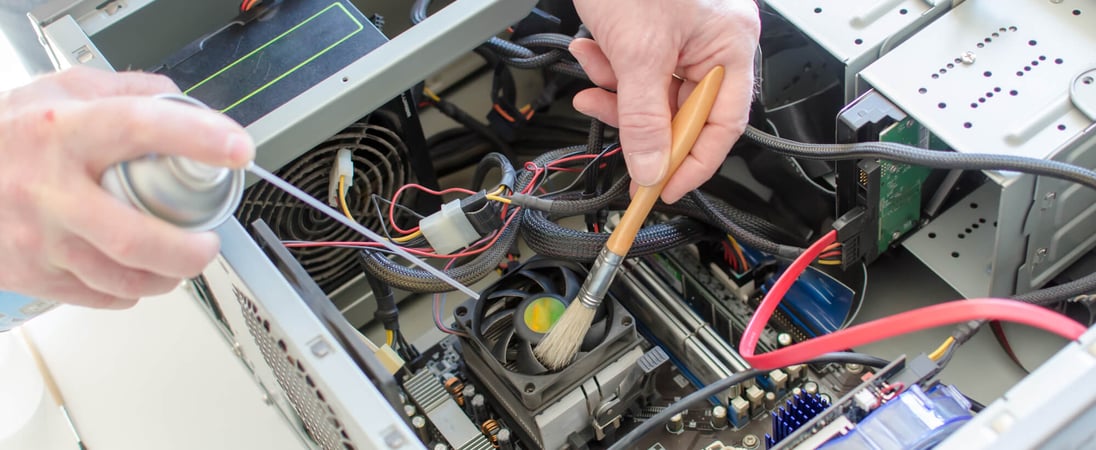
Clean the Dust Out
What to do on this day is right there in the name– clean out your computer! When was the last time you cleaned out your fans and dusted off your motherboard?
Have you looked at your graphics card to see if its cooling fan and fins are clean? For that matter, when did you last clean out you even opened the case?
Make sure that your system is powered down and disconnected (don’t panic! You’ll survive the half-hour or so you have it down, I promise!) and then find a good online tutorial to show you the way to get it done safely.
All that dust traps heat, and if you aren’t aware, computers really don’t function well under high stress and heat.
Start by tearing down that case, opening it up, and clean out all of the dust and grime that’s inside. You may have more dust than you think in there, and it’s causing your system to slow down.
Clean From the Inside Out
Get the Hard Drive cleaned out next. Perform some recommended system maintenance checks and tidy up those old files, apps, documents and other items that are no longer necessary.
A clogged up hard drive can be just as bad as a clogged up fan on your computer, though it won’t as often destroy your computer. Also, perform a cookie cleanup on your web browser to make it run more efficiently.
Now you can enjoy another year of a smooth running computer, almost as fast as the day you bought them!
History of National Clean Out Your Computer Day
National Clean Out Your Computer Day was started in 2000 as an initiative of the Institute for Business Technology.
The event was started to act as a reminder for people all over the world to get the most out of their computers — and stay safe while using them.
Facts About National Clean Out Your Computer Day
Dust Is One of the Leading Physical Threats to PCs
In field studies of electronics in offices and industrial settings, dust has been identified as a major contributor to computer failures because it clogs air vents, coats heat sinks, and slows or even stops cooling fans.
The U.S. General Services Administration notes that dust and restricted airflow can cause computers to overheat, which may shorten component lifespan or trigger sudden shutdowns, so many IT departments include internal dust removal as part of routine preventive maintenance.
Why Nearly Full Drives Can Slow a Computer
Modern operating systems rely on free disk space for “virtual memory” (paging/swap files) and for temporary working files; when a drive is close to full, the system has fewer contiguous blocks to work with and must work harder to read and write data.
Microsoft’s performance guidance explains that low free space can cause noticeable slowdowns because Windows constantly uses disk as an extension of RAM, especially during multitasking or large updates.
Browser Caches and Cookies Quietly Accumulate Megabytes
Web browsers routinely store cached images, scripts, and cookies to speed up browsing, but the stored data can grow into hundreds of megabytes or more over time.
Mozilla’s Firefox documentation notes that while a cache improves performance up to a point, a very large cache can consume significant disk space and may contribute to problems such as pages not updating correctly, which is why periodic clearing is part of standard troubleshooting advice.
Digital Clutter Has a Real Environmental Cost
Every file stored in the cloud or an email kept indefinitely sits on servers that must be powered and cooled around the clock.
The International Energy Agency estimates that data centers consume around 1–1.5% of global electricity use, and European “digital cleanup” campaigns highlight that deleting unneeded emails, files, and backups can help reduce storage demand and, incrementally, the energy footprint of digital services.
Most People Back Up Less Often Than Experts Recommend
Cybersecurity agencies recommend following the “3-2-1” backup rule—three copies of data, on two different media, with one off‑site—but surveys show that home users rarely meet this standard.
A 2023 poll cited by the World Backup Day initiative reported that about 25% of people never back up any of their devices, leaving them vulnerable to data loss from hardware failure, theft, or ransomware.
Unpatched Software Is a Common Pathway for Attacks
Many successful cyberattacks exploit known software vulnerabilities for which fixes already exist.
The U.S. Cybersecurity and Infrastructure Security Agency (CISA) maintains a catalog of “known exploited vulnerabilities” and repeatedly warns that failing to apply routine security updates on operating systems and applications is one of the most common and preventable risk factors for both individuals and organizations.
Physical Keyboard and Mouse Cleaning Is a Hygiene Issue Too
Computer peripherals are not only dust magnets but can harbor high levels of bacteria because they are touched constantly and seldom cleaned.
Research measuring microbial contamination in offices has found keyboards and mice can carry more bacteria per square inch than many common surfaces, leading health agencies such as the U.K.’s National Health Service to recommend regular cleaning of computer equipment as part of workplace infection-control practices.
Also on ...
View all holidays
National Pizza Day
Imagine sinking your teeth into a hot, crispy, cheesy slice of heaven. Each bite is a flavor explosion, transporting you to pizza paradise.

National Read In The Bathtub Day
Relax and rejuvenate while enjoying your favorite book in a soothing bath. It's a great way to unwind and escape from the hustle and bustle of daily life.


National Football Hangover Day
The party was legendary, the game was epic, but the hangover's no joke. Rally with comfort food, hydrate, and make the memories last!
We think you may also like...

World Photography Day
A beautiful way to tell a story, express emotions, and preserve the beauty of the world around us. Start capturing your own story today!

National Make Your Bed Day
Use Make Your Bed Day as an opportunity to begin a new habit that will help your sleep, get your day started right, and set the stage for even more good habits.

World Tessellation Day
Try creating your own tessellation using paper, pen, and scissors to help wrap your mind around these strange and fascinating math-based patterns.